






This new feature if for all users. You do not need an account to use it. It is quite simple, just follow the follwing steps:
- If you do not have the Excel file for the set yet, first you need to go there:

- This will download the Excel file for you
- Open the file in Excel or Open/Libre office or Google Sheet
- Update the numbers for the cards and save the file (For Google Sheet download the updated file as an Excel file):
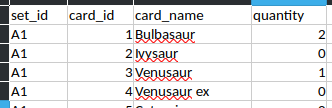
- Go to the instant report page and upload the updated Excel file:

- Submit and enjoy your instant report!

- You can use it anytime you want again after updating your Excel file